Getting started
Install Spool, load sample rows, match them, see each company keep its ID as more rows arrive, and get records out of a text, from the command line, over HTTP and over MCP.
This page installs Spool, makes a project with sample rows, matches them, shows that each company keeps its ID when more rows arrive, and gets three records out of a call note. It takes five minutes. Each step is shown three ways: the command, the HTTP call and the MCP tool. Use the command and read the other two. To find out first whether Spool fits your problem, read Limits.
What you need
- Linux on x86-64 or arm64, or macOS on Apple silicon. There is no Windows build.
curl.
Install
curl -fsSL https://github.com/alexpatow/spool/releases/latest/download/install.sh | shThe script downloads the release for your machine, checks it against its checksum, unpacks it under ~/.local/share/spool/0.1.0 and links ~/.local/bin/spool. It needs no root and changes nothing else. To do it by hand, download spool-0.1.0-<target>.tar.gz from the release, unpack it and put its bin directory on your search path. Keep bin and lib together: the binary loads the DuckDB library from ../lib.
spool --versionspool 0.1.0Create a project
spool init companies
cd companiescreated companies
sources/crm.yaml the columns of a CRM export
sources/notes.yaml what a record found in a note may say
entities/company/entity.yaml what companies are compared by
entities/company/rules/ three rules, one line of SQL each
transforms/name_key.sql the lower-case name the rules compare
extractors/companies.yaml a pattern that finds company names in text
samples/crm-1.csv six rows to load first
samples/crm-2.csv three more for later
samples/notes-1.txt a call note that names three companies
.gitignore keeps the server's data, .spool/, out of Git
cd companies
spool dev runs the server on this machine
spool load samples/crm-1.csv loads the first rows
spool extract samples/notes-1.txt finds the companies in the noteA project is a directory of files that you keep in Git. This one declares a source of rows, crm, a source of documents, notes, and one entity type, company. An entity type is a kind of thing you want one ID for. The sample rows:
id,name,country
c-1,Acorn Tools,GB
c-2,ACORN TOOLS,GB
c-3,Acorn Tools Ltd,GB
c-4,Larkfield Logistics,GB
c-5,Halden Group,GB
c-6,Halden Group,US
Start the server
spool devproject .
store ./.spool/dev.duckdb
applied 7e7d66320c2599ececa81aaa5885550a150b4b93f3cca956ee3deefba46921fd (declared company)
accounts ./.spool/dev.auth.sqlite
listening on http://127.0.0.1:7765
studio http://127.0.0.1:7765/
mcp http://127.0.0.1:7765/mcpIt listens on this machine only and asks nobody to sign in. Its data is in .spool/dev.duckdb, and it applies changes to the project's files as you save them. The last two lines are the addresses of the browser interface and of the endpoint an agent connects to. Leave it running and open a second terminal in the companies directory.
If something else is listening on port 7765, spool dev says so and names the fix: add --listen 127.0.0.1:7766 to the command, set SPOOL_URL=http://127.0.0.1:7766 in the second terminal, and use that address in the HTTP calls. A second spool dev on the same project is refused, because one server runs on a store at a time.
Load rows
spool load samples/crm-1.csvsource crm
type company
read 6 rows from samples/crm-1.csv
loaded 6 new, 0 already held, 0 new versions
next `spool match` places them in identitiesEach row is now a record. Loading does not match, and loading the same file again adds nothing.
The same over HTTP. The API calls loading "ingest":
curl -s -X POST 'http://127.0.0.1:7765/v1/ingest?source=crm&entity_type=company' -H 'content-type: text/csv' --data-binary @samples/crm-1.csvThe same as an MCP tool call, with one object for each row:
{ "name": "load_rows", "arguments": { "source": "crm", "entity_type": "company",
  "rows": [ { "id": "c-1", "name": "Acorn Tools", "country": "GB" } ] } }
Match
spool matchrun 2
type company
examined 6 records
candidates 4 pairs
judgements 3 match, 1 no_match
placed 6 records, 4 identities created
left out 0 records in 0 review itemsA match run compares the records that are new, with each other and with the ones it has placed before, and puts each in an identity. Four pairs were worth comparing. Three were judged the same company and one was not.
The same over HTTP, where a match is a run:
curl -s -X POST http://127.0.0.1:7765/v1/runs -d '{"entity_type": "company"}'The same as an MCP tool call:
{ "name": "run_match", "arguments": { "entity_type": "company" } }See the result
spool show recordssource and key name identity
crm:c-1 Acorn Tools 01a1ef8e-5a8d-76d4-acb6-2bb5ad4d4ada
crm:c-2 ACORN TOOLS 01a1ef8e-5a8d-76d4-acb6-2bb5ad4d4ada
crm:c-3 Acorn Tools Ltd 01a1ef8e-5a8d-76d4-acb6-2bb5ad4d4ada
crm:c-4 Larkfield Logistics 01a1ef8e-5a8d-76d4-acb6-2bb802d5ca25
crm:c-5 Halden Group 01a1ef8e-5a8d-76d4-acb6-2bb793e9d0ae
crm:c-6 Halden Group 01a1ef8e-5a8d-76d4-acb6-2bb65a02262aThat is the listing without its first column, which holds each record's own ID and is left out here to fit.
An identity is one company, with its ID and the records that belong to it. The three spellings of Acorn Tools have one identity. Its ID, in the last column, is the company's ID, and it is what other systems store. Yours differs from this one, because an identity's ID is minted when the identity is created. A record's ID is derived from its source, its key and its content, so yours are the same as the ones on these pages.
The same over HTTP:
curl -s 'http://127.0.0.1:7765/v1/records?source=crm'The same as an MCP tool call:
{ "name": "search_records", "arguments": { "source": "crm" } }Ask why
spool explain crm:c-5 crm:c-6`crm:c-6` belongs to identity 01a1ef8e-5a8d-76d4-acb6-2bb65a02262a and `crm:c-5` to identity 01a1ef8e-5a8d-76d4-acb6-2bb793e9d0ae.
Run 2 (strategy `rules`) judged them `no_match` (no_match rule `different_country` held).
Both were placed at log position 1 by `engine` (reconcile run 3, "reconcile new records").
By the rules as they are now, block rule `name_prefix` makes them a candidate pair and no_match rule `different_country` holds, so they would be judged `no_match`.
left 34a5d12a-11a0-e461-c6e4-0576f546d165 crm:c-6 identity 01a1ef8e-5a8d-76d4-acb6-2bb65a02262a
right 38f040c9-82b9-2f94-813b-697309e52dab crm:c-5 identity 01a1ef8e-5a8d-76d4-acb6-2bb793e9d0ae
features
left right
country US GB
name Halden Group Halden Group
name_key halden group halden group
rules as they are now
block name_prefix holds
no_match different_country holds
match similar_name holds
runs that compared them
run 2 rules succeeded block: name_prefix no_matchThe two Halden Groups have the same name and different countries. The rule that kept them apart is one line:
-- A no_match rule says a pair is not the same thing, and wins over any
-- match rule. This one holds only when both rows have a country.
l.country <> r.country
The rule that matched "Acorn Tools Ltd" to "Acorn Tools" is one line too:
-- A match rule says a pair is the same thing: here, two names that are
-- close. The similarity is 1 for equal names and 0 for names with nothing
-- in common.
jaro_winkler_similarity(l.name_key, r.name_key) >= 0.92
A rule is a SQL condition over two records, l and r. Matching explains the three kinds.
The same over HTTP:
curl -s 'http://127.0.0.1:7765/v1/explain?a=crm:c-5&b=crm:c-6'The same as an MCP tool call:
{ "name": "explain_pair", "arguments": { "a": "crm:c-5", "b": "crm:c-6" } }Send more rows
The second sample file has two names that are spelt wrongly and one company that is new:
id,name,country
c-7,Larkfeild Logistics,GB
c-8,Kestrel Analytics,US
c-9,Acorn Tool,GB
spool load samples/crm-2.csv
spool matchsource crm
type company
read 3 rows from samples/crm-2.csv
loaded 3 new, 0 already held, 0 new versions
next `spool match` places them in identities
run 5
type company
examined 3 records
candidates 4 pairs
judgements 4 match, 0 no_match
placed 3 records, 1 identity created
left out 0 records in 0 review itemsspool show recordssource and key name identity
crm:c-1 Acorn Tools 01a1ef8e-5a8d-76d4-acb6-2bb5ad4d4ada
crm:c-2 ACORN TOOLS 01a1ef8e-5a8d-76d4-acb6-2bb5ad4d4ada
crm:c-3 Acorn Tools Ltd 01a1ef8e-5a8d-76d4-acb6-2bb5ad4d4ada
crm:c-4 Larkfield Logistics 01a1ef8e-5a8d-76d4-acb6-2bb802d5ca25
crm:c-5 Halden Group 01a1ef8e-5a8d-76d4-acb6-2bb793e9d0ae
crm:c-6 Halden Group 01a1ef8e-5a8d-76d4-acb6-2bb65a02262a
crm:c-7 Larkfeild Logistics 01a1ef8e-5a8d-76d4-acb6-2bb802d5ca25
crm:c-8 Kestrel Analytics 01a1ef8e-5f06-7397-9a0c-445aaacfd3fe
crm:c-9 Acorn Tool 01a1ef8e-5a8d-76d4-acb6-2bb5ad4d4ada"Acorn Tool" and "Larkfeild Logistics" joined the identities that existed, and those kept their IDs. Kestrel Analytics is new and got a new one. Nothing that was placed before moved.
Extract records from text
Rows are one way in. The other is text: an extractor reads a document and says where it names a company, and each place becomes a record. The project has a sample document and a sample extractor.
Call with Dana Reyes on 12 November. She has moved to Acorn Tools Ltd and runs
purchasing there. They now ship through Larkfield Logistics Ltd, and she asked
whether we work with Brightwater Foods Ltd, their new supplier.entity_type: company
attribute: name
pattern: '(?:[A-Z][A-Za-z]+ )+(?:Ltd|Inc|LLC|GmbH|plc)\b'This extractor is a pattern, which Spool runs itself: no model, no key and nothing to install. A run of capitalised words that ends in a legal form is a company, and the text it matched is the record's name.
spool extract samples/notes-1.txtsource notes
read 1 document from samples/notes-1.txt
loaded 1 new, 0 already held, 0 new versions
extractor companies
found 3 records in 1 document: 3 new, 0 already held
company Acorn Tools Ltd notes-1.txt[54-69]
company Larkfield Logistics Ltd notes-1.txt[119-142]
company Brightwater Foods Ltd notes-1.txt[179-200]
next `spool match` places them in identitiesThree records came out of the note. Each keeps where it was found: the document and the characters. They are records like the rows, so the same rules match them.
spool matchrun 10
type company
examined 3 records
candidates 6 pairs
judgements 6 match, 0 no_match
placed 3 records, 1 identity created
left out 0 records in 0 review itemsspool show records --source notessource and key name identity
notes:notes-1.txt[54-69] Acorn Tools Ltd 01a1ef8e-5a8d-76d4-acb6-2bb5ad4d4ada
notes:notes-1.txt[119-142] Larkfield Logistics Ltd 01a1ef8e-5a8d-76d4-acb6-2bb802d5ca25
notes:notes-1.txt[179-200] Brightwater Foods Ltd 01a1efb4-93c3-7745-8408-dcbf0c81e6f3"Acorn Tools Ltd" in the note has the ID that the CRM rows for Acorn Tools have, and Larkfield Logistics has its own. Nothing held Brightwater Foods, so it got a new ID. spool show records <record> prints the sentence a record was found in.
The same over HTTP, in two calls: store the document, then run the extractor.
curl -s -X POST 'http://127.0.0.1:7765/v1/documents?source=notes&key=notes-1.txt' -H 'content-type: text/plain' --data-binary @samples/notes-1.txtcurl -s -X POST http://127.0.0.1:7765/v1/extractions -d '{}'The same as MCP tool calls:
{ "name": "load_documents", "arguments": { "source": "notes",
"documents": [ { "key": "notes-1.txt", "text": "Call with Dana Reyes on 12 November. ..." } ] } }{ "name": "run_extraction", "arguments": { "extractor": "companies" } }A pattern finds only what is written the way it expects: "Acorn Tools" without "Ltd" is missed. The next step up is an extractor that asks a language model. That is a Python or TypeScript file in extractors/, which Spool runs with uv or bun, so one of those has to be installed for it. Extraction writes one.
Connect an agent
The server speaks the Model Context Protocol (MCP) at the mcp address it printed. spool dev asks for no token. For Claude Code:
claude mcp add --transport http spool http://127.0.0.1:7765/mcpFor Codex:
codex mcp add spool --url http://127.0.0.1:7765/mcpThen ask it, for example: "Load samples/crm-2.csv into Spool, match it, and tell me why c-5 and c-6 are different companies." The tools it has for that are load_rows, run_match, search_records and explain_pair, with load_documents and run_extraction for text. MCP lists every tool and what an agent cannot do.
Look at it in a browser
The studio is at http://127.0.0.1:7765/. Its Identities screen lists the six companies:
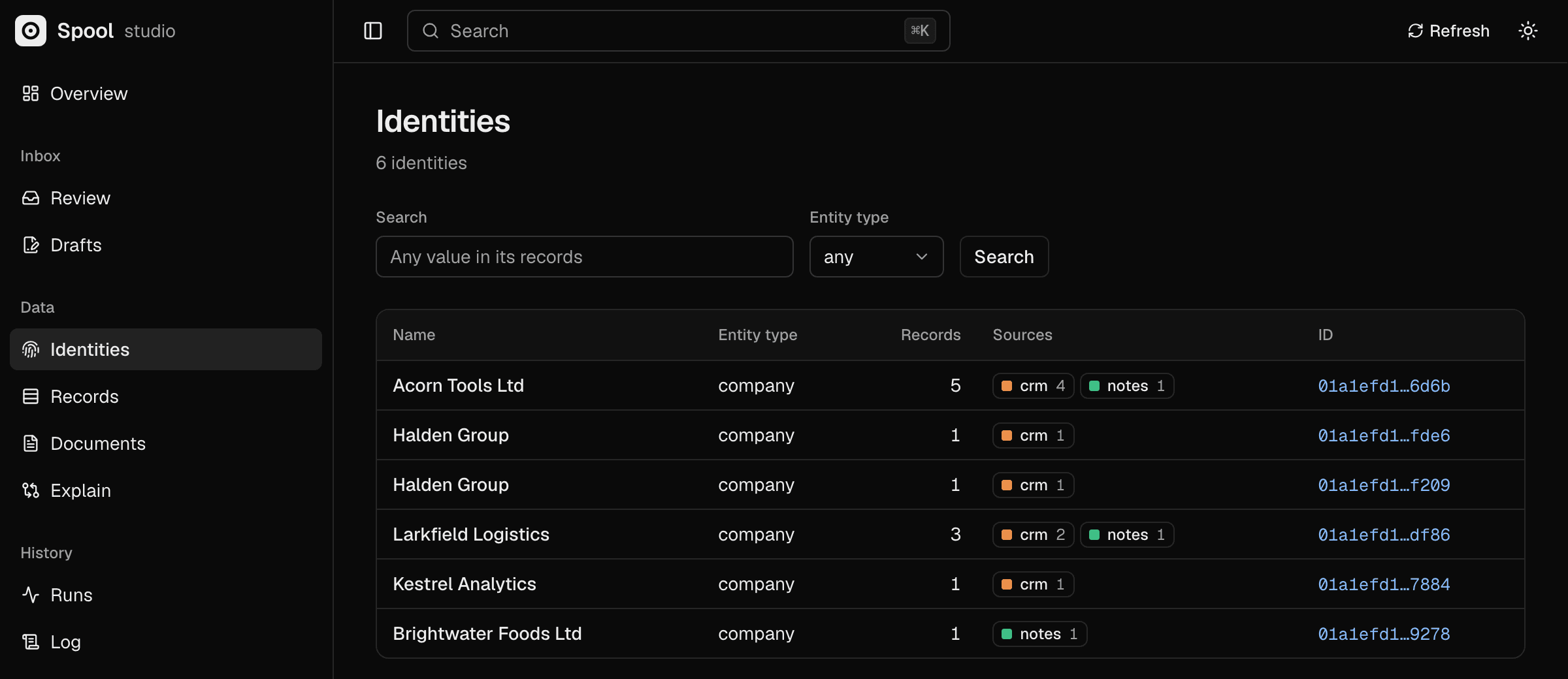
The studio shows the same records, identities and explanations, and it can merge two identities, split one and undo a change.
Stop
Ctrl-C in the first terminal stops the server. The data stays in .spool/dev.duckdb. To start from nothing, stop the server and delete .spool.
Next
- Point it at your own rows: edit the columns in
sources/crm.yamland the rules, thenspool load your-file.csv --source crm. Project structure lists every file. - Write an extractor that asks a model. Extraction
- What happens when a rule gets better. Matching
- Merge, split and undo. Identities
- Read the IDs from your own code. Using the IDs